Deploy OpenClaw in 30 Seconds
We host OpenClaw for you — a powerful open-source AI assistant on Telegram, WhatsApp & more.
No servers. No setup. Just sign up and your OpenClaw instance is live.
ClawInst is the easiest way to run OpenClaw — the open-source AI assistant framework
Research top 5 AI tools this week and write a summary
On it! Browsing the web for the latest AI releases...
The Hard Way vs. ClawInst
Same result. Wildly different effort.
Manual Setup
Self-hosted OpenClaw
If you're non-technical, multiply every line by 10x — you'll need to learn each step before you can do it.
ClawInst
We handle everything
Choose a model, connect Telegram, hit deploy. Your assistant is live before you finish reading this.
Start Free. Upgrade When You Need More.
Try free AI models with a 3-day trial — no credit card required. Upgrade to Pro for premium models and more credits.
Try everything free for 3 days. No credit card, no commitment.
What's included
- Access to free AI models (Gemini, Llama & more)
- Your own dedicated cloud server
- Telegram & web chat included
- Persistent memory across conversations
- 59+ built-in skills — browser, code, files & more
- OpenClaw Dashboard — manage everything from one place
No credit card required · Deploy in 30 seconds
$10 goes to your AI usage — you pay just $2 for hosting
What's included
- Everything in Free, plus:
- All premium AI models — Claude Opus, GPT-4, Gemini Pro & more
- $10 of AI credits included every month
- All channels — Telegram, WhatsApp, Discord & Slack
- Dedicated cloud server (2 GB RAM, 2 vCPUs)
- Priority support
Need more AI credits?
Buy one-time top-ups from your dashboard.
Why not self-host OpenClaw?
You absolutely can — OpenClaw is open source. But you'll need to rent a VPS ($5–18/mo), install Docker, configure the gateway, wire up API keys, and keep it all maintained. With ClawInst, your server is pre-configured and running in under 30 seconds. The free trial lets you test everything before committing.
Powered by OpenClaw
A full-featured AI assistant platform with browser control, tools, persistent memory, and multi-channel support — all managed through a clean dashboard.
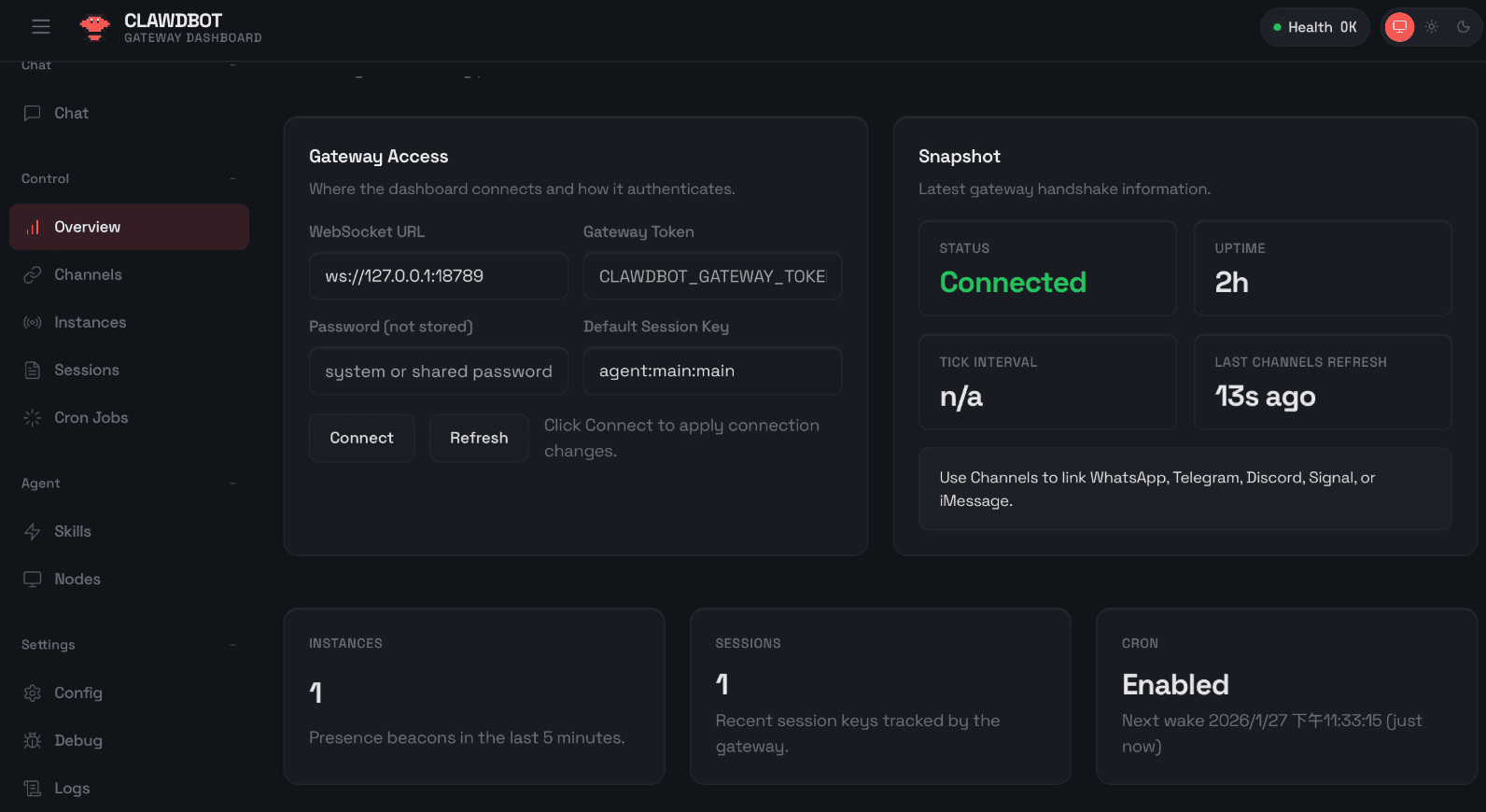
OpenClaw Dashboard
Manage your AI assistant, view conversations, switch models, and configure tools.
Three Steps. That's It.
From sign-up to chatting with your AI in under 30 seconds. Free.
Sign Up Free
One click with Google. No credit card, no forms, no verification. You're in.
Pick a Model & Connect
Choose from free AI models (or upgrade for premium). Connect your Telegram bot in 60 seconds.
Your AI is Live
Your private assistant deploys instantly. Start chatting — it's already running.
No credit card · Free models included · Cancel anytime
What people are building
Real use cases from the OpenClaw community
All of this is possible with the free trial. No upgrade needed.
Deploy Your Assistant FreeEverything You Need
All the power of OpenClaw, none of the complexity. All included free.
One-Click Setup
Pick your AI model, paste a Telegram token, and launch. No terminal, no config files.
Your Own Cloud Instance
Each user gets a private, isolated OpenClaw instance running 24/7 on our cloud.
Chat on Telegram
Talk to your AI assistant through Telegram, the app you already use every day.
Choose Your Model
Free models included. Upgrade to Pro for Claude, GPT-4, and more. Switch anytime.
Persistent Memory
Your assistant remembers you, your preferences, context, and past conversations.
Powered by OpenClaw
Built on the open-source OpenClaw platform, browser control, skills, tools, and more.
All 59+ skills included in the free trial. No restrictions.
Start Your Free TrialLoved by Users
Join 294+ people who deployed their AI assistant with ClawInst.
“Signed up for the free trial just to test it. Within 5 minutes my assistant was drafting emails and rewriting copy on Telegram. The free models are genuinely good. Upgraded to Pro the next day.”

Marcus Cole
Freelance Copywriter
“Was self-hosting OpenClaw and spending more time fixing Docker than using the assistant. ClawInst gave me the same setup in 30 seconds. Free trial sold me instantly. Haven't touched a terminal since.”

Ryan Mitchell
Full-Stack Developer
“We use it to summarize Slack threads, prep meeting notes, and research competitors. The free trial gave us enough time to know this was worth it. Now the whole team uses it.”

Brandon Hayes
Product Manager
Frequently Asked Questions
Everything you need to know about the free trial and Pro plan.
Yes! You get a full 3-day free trial with access to free AI models, your own cloud server, Telegram chat, persistent memory, and all 59+ built-in skills. No credit card required — just sign in with Google and deploy.
Your AI Assistant is Waiting
Free AI models. 59+ skills. Deploy in 30 seconds. No credit card. No strings attached.
About ClawInst — OpenClaw Made Easy
What is ClawInst?
ClawInst is the easiest way to deploy OpenClaw AI assistants. It's a managed platform that handles all the complexity of running OpenClaw — no Docker, no terminal, no SSH, no config files. Just sign up, pick an AI model, and deploy your personal AI assistant to Telegram, WhatsApp, Discord, or Slack in under 30 seconds.
Why ClawInst?
Self-hosting OpenClaw requires hours of setup with Docker, server provisioning, API key management, and ongoing maintenance. ClawInst eliminates all of that with one-click deployment, included API keys, automatic security, and managed cloud infrastructure. Whether you're looking for a personal AI assistant, an alternative to Molt Bot or Simple Claw, or simply the easiest way to deploy OpenClaw — ClawInst is built for you.
Supported AI Models
ClawInst supports multiple AI models including Claude Sonnet 4.6 by Anthropic, GPT-4 and GPT-5 by OpenAI, Gemini by Google, and free open-source models. Hot-swap between models anytime from the dashboard — no restart required. API keys for all models are included.
Secure OpenClaw Deployment
Every ClawInst user gets their own isolated Docker container with gateway authentication, filesystem sandboxing, and encrypted API key management. Your conversations and data are never shared with other users. ClawInst provides enterprise-grade security for every deployment, automatically configured.